Windows
Windows 10 or 11, 64-bit. Guided installer.
Download installerFree preview
One small launcher signs you in, installs the game, keeps it up to date and shows the latest news. Install it once, then press Play.
Pick the download for your system below.
No launcher has been published yet, so the buttons below are switched off. This page checks for a release every time you open it and will light up the right download the moment one exists. To be told when it does: bookmark this page, or watch the news page (no email list, no tracking).
Windows 10 or 11, 64-bit. Guided installer.
Download installermacOS 11 or newer. Apple Silicon and Intel.
Download disk imageThis release also has separate builds: Apple Silicon (arm64) Intel (x64)
64-bit, glibc 2.31 or newer. Portable AppImage.
Download AppImageThese are early preview builds. The installers are not yet code-signed, so Windows and macOS will show a warning the first time you open them (see What your computer will say). Only download from this page or from dl.swordandseal.com, and verify the checksum if you want to be certain.
Install guide
Run the Windows installer, open the macOS disk image and drag the launcher into Applications, or mark the Linux AppImage as executable and run it.
Create an account or sign in. The launcher then downloads the game files, checks every file against a checksum, and resumes if your connection drops. First install is the largest download; updates only fetch what changed.
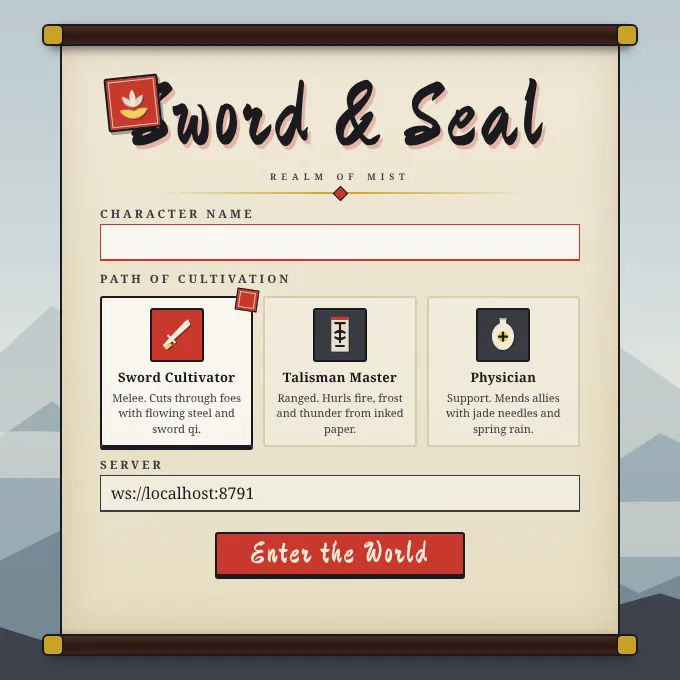
Pick your character name and class on the login scroll and enter the world. The launcher hands the game a one-time login token, so your password never goes into the game window.
What the launcher does
System requirements
Target requirements for the preview. TODO-config: confirm after the first public build is tested on each OS
| Component | Minimum | Recommended |
|---|---|---|
| Operating system | Windows 10 64-bit, macOS 11, or a 64-bit Linux with glibc 2.31 (Ubuntu 20.04 or similar) | Windows 11, current macOS, or a current Linux desktop |
| Processor | Dual-core, 2 GHz | Quad-core, 3 GHz |
| Memory | 4 GB | 8 GB |
| Graphics | Any GPU with WebGL 2 and hardware acceleration on | A dedicated or recent integrated GPU with current drivers |
| Storage | About 1 GB free for launcher and game files | 2 GB free |
| Network | Broadband. Outbound HTTPS (port 443) to dl.swordandseal.com and play.swordandseal.com, including secure WebSocket | Wired or stable Wi-Fi, low latency |
| Linux extras | FUSE 2 (libfuse2) to run an AppImage | - |
Unsigned preview builds
Code-signing certificates are on the way. Until signing is live, your operating system cannot recognise the publisher and will warn you. That warning is expected for these builds. If the file you hold does not match the checksum below, do not run it.
You may see "Windows protected your PC". Choose More info, check that the file name is SwordAndSeal-Launcher-Setup.exe, then choose Run anyway. Your browser may also ask you to confirm that you want to keep the download.
macOS may say the app "cannot be opened because the developer cannot be verified". Open the disk image, then Control-click (or right-click) the launcher and choose Open, then Open again. If that option is missing, go to System Settings, Privacy & Security, scroll down and choose Open Anyway.
Mark the AppImage as executable, either in your file manager's properties or with chmod +x SwordAndSeal-Launcher.AppImage, then run it. If it does not start, install libfuse2.
The launcher is served only from dl.swordandseal.com over HTTPS, publishes its SHA-256 here, and never asks for anything beyond your game account. Signing removes the warning; it does not change what the software does.
Verify your download
Compare the hash your computer calculates with the one listed for your file above. They must match exactly.
Open PowerShell in your Downloads folder:
Get-FileHash .\SwordAndSeal-Launcher-Setup.exe -Algorithm SHA256Expected: published with each release
Open Terminal in your Downloads folder:
shasum -a 256 SwordAndSeal-Launcher.dmgExpected: published with each release
In a terminal in your Downloads folder:
sha256sum SwordAndSeal-Launcher.AppImageExpected: published with each release
See the launcher troubleshooting answers on the support page, or write to support@xianwuligroup.com.